


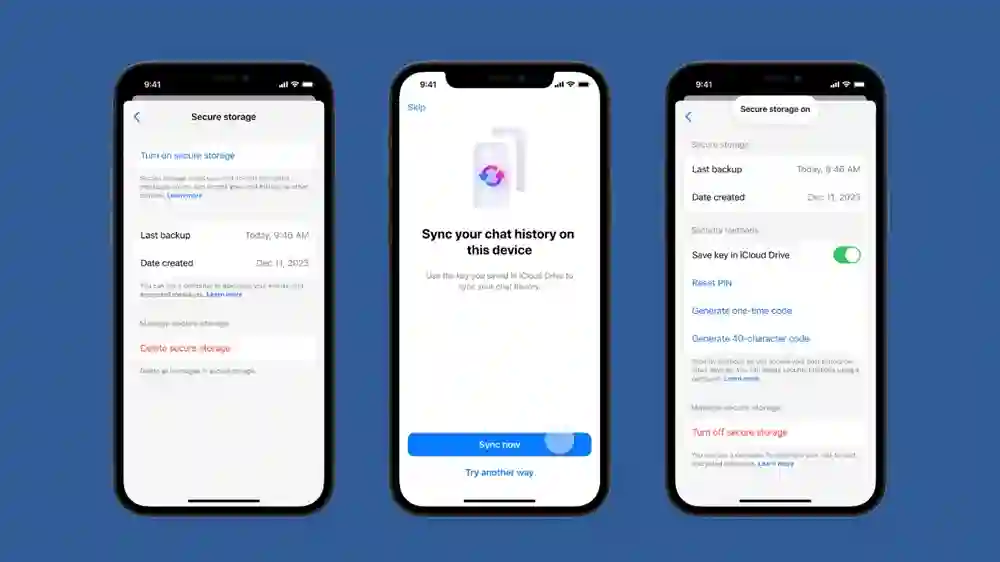
Alright, so you’re here because Messenger’s end-to-end encryption is driving you a little nuts, huh? I get it. One minute you’re messaging your buddy about weekend plans, next thing you know, your chat’s locked like a treasure chest. You’re not alone. A lot of us have wondered how to disable end-to-end encryption on messenger without breaking stuff or starting World War 3 with Meta’s privacy policy.
Let’s dive into this whole encryption madness — and more importantly, how to turn it off like a civilized human being (or at least try).
What Even Is End-to-End Encryption?
Before we talk about how to disable end-to-end encryption on messenger, let’s rewind for a sec.
In simple terms:
- It scrambles your messages into unreadable gibberish
- Only you and the person you’re chatting with can unscramble it
- Not even Zuckerberg (probably) can peep it
Sounds nice in theory. But sometimes it’s just… overkill. Like wearing a bulletproof vest to a pillow fight.
Why People Want It Off
- Can’t report harmful messages
- Message syncing is a pain
- Notifications don’t show message previews
- It just feels too “locked down” sometimes
I mean, I once missed an important message from my mom because it was all hidden under encryption. Missed dinner. Ate ramen. Again.
So… Can You Actually Disable It?
Here’s the plot twist: Facebook (Meta, whatever) made it optional for now. But not always easy to switch off.
Some chats are encrypted by default, especially “Secret Conversations.”
So if you’re Googling how to disable end-to-end encryption on messenger, you’re not being paranoid — you’re being practical.
Quick Reality Check:
- You can disable it for new chats by not starting them as secret
- Existing encrypted chats? Gotta ditch and restart ’em
Yeah, kinda annoying. But we’ll walk through it, step by step.
Step-By-Step: How To Disable End-To-End Encryption On Messenger
Alright, here’s where the magic (sort of) happens.
Step 1: Identify Encrypted Chats
Encrypted chats usually have:
- A lock icon
- “Secret Conversation” written somewhere
If you don’t see either, congrats — you’re already out of the encryption zone.
But if it is encrypted, and you’re serious about figuring out how to disable end-to-end encryption on messenger, keep going.
Step 2: Start a New, Non-Secret Conversation
This is the trick. You can’t remove encryption from an existing chat. You have to start a new one. Yeah, weird right?
- Open Messenger
- Tap the pencil icon (top-right corner usually)
- Do NOT toggle on the lock icon (that’s what makes it encrypted)
- Choose your contact
- Say something cool like “Hey, testing this without encryption lol”
Now you’re back in the clear. No more encryption cloak.
If you were just here for the fast track on how to disable end-to-end encryption on messenger, that’s it. That’s the workaround.
Step 3: Delete the Old Encrypted Chat (Optional But Kinda Satisfying)
- Long press the old secret convo
- Hit “Delete”
- Poof — it’s gone
Now, you won’t accidentally slide back into encryption land.
But Wait — What About Group Chats?
Oh boy. Group chats are a whole different beast.
As of now, Meta hasn’t rolled out encryption on all group chats by default. Some are, some aren’t. You’ll know by the usual lock icon.
If you do find one that’s encrypted and you’re itching to know how to disable end-to-end encryption on messenger, here’s what to do:
- Leave the encrypted group
- Create a new one
- Don’t toggle the lock
That’s really it. Felt anticlimactic, right?
Some Things To Keep in Mind
Here’s where I level with you. This whole encryption thing? It’s not going away. Meta’s planning to go all-in eventually.
So while you’re figuring out how to disable end-to-end encryption on messenger, just know:
- Some features are limited in encrypted chats (voice calls, message forwarding, etc.)
- Notifications behave differently
- You can’t recover encrypted chats if you lose access
Honestly, it’s like the digital version of burning your diary every night. Cool for spies, overkill for texting about pizza.
A Few Personal Thoughts (AKA, Me Venting)
I remember the first time I tried using secret conversations. Thought I was some kinda cyber ninja. Then I realized I couldn’t send GIFs. That ended fast.
My cousin once sent me a message like “you HAVE to see this!” — but it was encrypted and wouldn’t load because I had a new phone. Never found out what it was. Probably something dumb. Or aliens. Who knows?
If I had a dollar for every time someone asked me how to disable end-to-end encryption on messenger, I’d probably have like, $11. Still. Enough for pizza.
What Happens If You Leave Encryption On?
Just for fun, let’s flip the coin.
Here’s what you’re signing up for if you keep it:
- Extra privacy (duh)
- No message previews on lock screen
- Might not sync between devices
- Harder to report abuse
It’s kinda like switching to private mode in your browser. You feel sneaky… until you remember it logs you out of everything.
TL;DR:
| Feature | With Encryption | Without Encryption |
| Message previews | No | Yes |
| Sync across devices | Limited | Full |
| Report messages | Nope | Yep |
| Send cool stuff (GIFs, etc) | Limited | Everything works |
See what I mean?
Common Mistakes When Trying To Disable It
Alright, don’t feel bad. We’ve all messed this up. A few things I’ve personally done (more than once):
- Forgot to un-toggle the lock icon when starting new chats
- Confused archived chats with encrypted ones
- Thought turning it off in Settings would work (spoiler: it doesn’t)
Learning how to disable end-to-end encryption on messenger isn’t hard. But the process is sneakily weird.
It’s like those IKEA instructions — looks simple, but somehow you end up with extra screws and a dented bookshelf.
Is It Even Worth Disabling?
Look, I won’t pretend I have all the answers. Privacy is important. But so is convenience. And not missing your aunt’s message about dinner.
If you’re not dealing with state secrets or planning a heist, disabling it might just make your life easier. I did it. Haven’t looked back.
Unless they make it default for everything. Then… well, we riot. Or adapt. Probably adapt.
Final Tips for Smooth Sailing
If you’re still asking how to disable end-to-end encryption on messenger, let me leave you with a few extra pointers:
- Save important chats elsewhere (you never know)
- Use desktop Messenger if mobile gets buggy
- Don’t overthink it — most people don’t notice the difference anyway
And hey, if nothing else, now you can help that one friend who still thinks encryption means aliens are watching.
Wrapping It Up — But Not Too Neatly
So yeah. Disabling Messenger’s encryption isn’t some dark art. Just gotta know where to tap and what not to tap. It’s a little inconvenient, but manageable.
Honestly, I wrote part of this with my cat walking across my keyboard. Wrote another part by hand. Then spilled coffee on it. Classic.
Hope it helps. And if someone asks you later how to disable end-to-end encryption on messenger, send them this. Or don’t. Make ’em suffer like we did.